Xzadik Senchō

Install without a jailbreak

Add a mod to an app with Sideloadly.

Jailbroken? Add the repo instead.On your phone? Use the Injector.

Requirements

Install the mod

  1. Download Sideloadly from sideloadly.io.
    The DEB also works with Feather and Impactor. See their documentation.
  2. Download the DEB from the catalog.
  3. Connect your device to your computer, then open Sideloadly.
  4. Drag the IPA into Sideloadly.
    Match the version. Each mod is tested against one version of its app, shown on the mod’s page. Others may work, but are untested.
  5. Enter your Apple ID.
    If two-factor authentication is on, use an app-specific password.
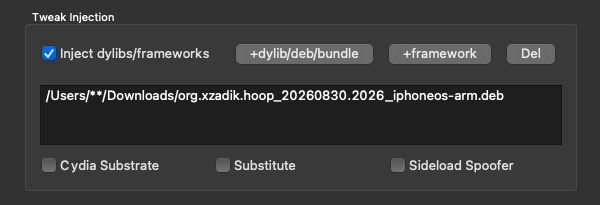
  6. Click Advanced Options, then add the DEB under Tweak Injection.
    Sideloadly Advanced Options: the .deb added under Tweak Injection
  7. Click Start. Sideloadly signs the app and installs it on your device.
  8. On your device, go to Settings > General > VPN & Device Management, then trust your Apple ID.
  9. On iOS 16 or later, turn on Settings > Privacy & Security > Developer Mode, then restart. Confirm when the device starts back up.
    Developer Mode only appears once an app has been installed this way. Earlier versions of iOS do not have the setting.
  10. Open the app, then open the mod’s menu to turn on features.

Troubleshooting

The app stops opening after about a week

A free Apple ID signs an app for seven days. To keep using it, install the app again. A paid Apple Developer account signs apps for one year.

“Unable to install”

A free Apple ID can install up to three apps at a time. Remove one, then try again.

“Untrusted Developer”

The signing profile must be trusted before the app will open. See step 8.

The app crashes, or no menu appears

The mod is tested against the version shown on the mod’s page. Others may not load. Install the listed version, and make sure the IPA is decrypted.

The app installs but will not open

On iOS 16 or later, Developer Mode must be on. See step 9.